Get synced lyrics to scroll with your own music files
Drop an .lrc file in beside the song and Refrain pairs them by filename. How LRC and SRT work, what SYLT and USLT are, and which one wins.
Put the .lrc file next to the song with the same filename — Harbour Lights.mp3 and
Harbour Lights.lrc — and import them together. Refrain pairs them automatically. The words
then scroll in the Now Playing screen with the current line highlighted, and there is no
matching step, no lyrics search, and no internet involved.
The short version
- Same filename, different extension. That is the whole pairing rule.
.lrcand.srtboth work. So do lyrics already embedded in the file.- Order of preference: a sidecar file beats embedded synced lyrics, which beat embedded plain lyrics.
- Nothing is fetched online. If you have no lyrics file, you get no lyrics.
- Presentation mode blows the current line up full screen for a room.
What an LRC file is
A plain text file with a timestamp on each line:
[00:12.40]Harbour lights are coming on
[00:16.85]One by one along the wall
[00:21.10]And I am still not going home
That is all. The timestamps say when each line starts, the player follows along. You can open one in any text editor, and if a line drifts you can nudge the number by hand.
.srt is the subtitle format — same idea with a start and end time per line, which Refrain
also reads.
Getting lyrics onto the phone
Import both files together. Select the MP3 and the LRC in the same import — Add → Choose files, or drag both onto the Wi-Fi transfer page — and they arrive paired.
Or import the LRC afterwards. It still matches on filename. Bring in
Harbour Lights.lrc later and it finds the song it belongs to.
Or tap the file in Files. An .lrc opened from the Files app imports into Refrain and
pairs the same way.
The filename has to actually match. Harbour Lights.mp3 and harbour-lights.lrc will not
find each other, and that mismatch is behind almost every "why are my lyrics not showing"
message. Rename one to match the other.
Lyrics already inside the file
Some files carry their lyrics internally, in ID3 frames — SYLT for synced lyrics with
timings, USLT for plain unsynced text. Refrain reads both, and if a track has them you do
not need a sidecar file at all.
When a song has more than one source, the order is:
- A sidecar
.lrcor.srtfile — always wins. - Embedded
SYLT— synced, so it scrolls. - Embedded
USLT— plain text, displayed without scrolling.
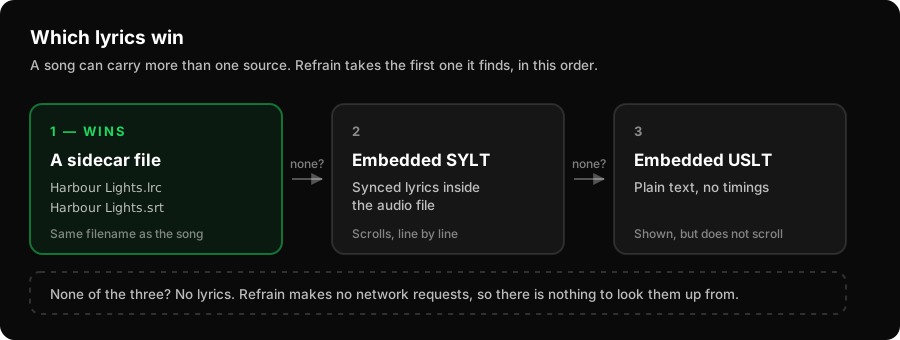
The reason a file beats the embedded version is that the file is the one you chose to add. If you have gone to the trouble of timing lyrics yourself, that should override whatever was baked into the MP3 by whoever made it.
Timing your own lyrics
If a song has no lyrics file and you want one, you have to time it. That means playing the track and marking where each line starts — tedious by hand in a text editor, quick in a tool built for it.
TuneMason does this, and exports .lrc. Take that file, drop it beside the song, import
both, and it works with no further setup. The two products are built to hand off at exactly
that point.
You can also write one by hand for a short song. The format is simple enough that it is a reasonable thing to do once.
Presentation mode
Tap into the lyrics on the Now Playing screen and Refrain can show one line at a time, full screen, sized for reading across a room rather than at arm's length. Turn the phone sideways and the type gets substantially bigger again.
This is for rehearsals, singalongs, a class, a service, or a phone propped against a laptop while you learn the words. The full guide covers using it with a stand and an external display.
What this doesn't do
It does not look lyrics up. There is no lyrics database, no fetch, no matching against
an online service. Refrain makes no network requests at all in normal use, and adding a
lyrics lookup would break that. If you have no .lrc and the file has nothing embedded,
the Now Playing screen simply has no lyrics to show.
It does not time lyrics for you. Refrain plays a timed file; it does not generate the timings. That is a different job and it needs a different tool.
It does not write lyrics back into the MP3. Consistent with everything else here, your original file is not modified.
Related
Last updated 7 August 2026